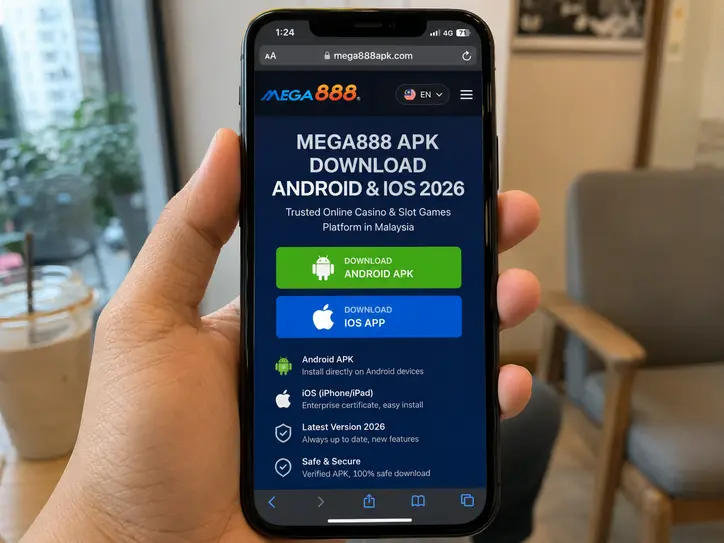
A search for Mega888 APK download 2026 produces many websites using the words “official”, “original” or “verified”. Those labels are marketing claims, not technical proof. Mega888 is not distributed through a single Malaysian app-store listing that lets Google Play or Apple display one publisher, one version history and one stable download page. The practical question is therefore not simply “Which button works?” but “Can I trace this exact file to the source I intended to use?”
DimSum reviewed the public setup routes of three active distribution websites in July 2026. Before installing, read our Mega888 Malaysia Honest Review for the complete platform, support and transaction test. That comparison records what we actually opened and tested; it does not declare every later file from those domains malware-free.
Mega888 APK Download 2026: Quick Overview
| Check | What public pages displayed | DimSum safety verdict |
|---|---|---|
| App version | Version 1.2, described as a 2025/2026 patch | Two reviewed pages displayed v1.2 on 20 August 2026, but we found no central publisher changelog confirming it as the universal latest build. |
| Advertised file size | 48.5 MB for Android; 62.1 MB for iOS on one reviewed support page | Use these only as comparison clues. A matching size does not prove two files contain identical code. |
| OS compatibility | Android 5.0–14 and iOS 15–18 were among the ranges advertised | Compatibility claims varied by distributor and were not independently tested on every Samsung, Oppo, Vivo, Xiaomi, Huawei or iPhone model. |
| Official hash safety | No reproducible SHA-256 value was visible on the download pages we checked | Not independently verifiable. One page mentions MD5 checking but does not publish the value readers need for comparison. |
| Public app-store listing | No matching Google Play or Apple App Store listing was identified by our review | Android requires sideloading. Public iPhone distribution through an Enterprise profile deserves extra caution. |
| Last source check | 20 August 2026 | Recheck version, domain, certificate name and server status before every Mega888 update. |
A cryptographic hash is useful only when a trusted publisher displays the expected value separately from the file. If a download page supplied both a file and its hash, a malicious replacement could alter both. For stronger integrity checking, the expected SHA-256 should also appear on an established publisher channel. Until that exists, no responsible reviewer should call the hash “officially safe”.
How to Check a Mega888 Original Download Link
Do not start from a forwarded WhatsApp attachment, QR code in a group chat or shortened URL. Open the domain you previously verified, navigate from its homepage and make the following comparison:
- Read the full hostname. Look for swapped letters, added hyphens and unfamiliar subdomains. HTTPS encrypts the connection; it does not prove that the website is the genuine operator.
- Check the page history. A stable download page should also provide contact, privacy, terms and update information. A one-page clone with only a large button gives you little to verify.
- Record the details before downloading. Note the advertised version, file size, update date and developer or certificate name.
- Avoid renamed attachments. A file called
Mega888_latest.apkmay contain anything. The filename is not a signature. - Keep Play Protect active. Google says Play Protect checks apps from outside Google Play and may warn, disable or remove harmful apps. Do not follow instructions that ask you to switch it off.
If the link arrived through a chat, use our separate checklist for a gaming APK sent over WhatsApp before proceeding.
Step-by-Step Android Installation Guide
Menu names differ slightly between Pixel, Samsung Galaxy, Oppo, Vivo, Realme and Xiaomi phones, but modern Android grants installation permission to a specific source app. You do not need to disable phone-wide security.
1. Download from the verified page
Use the browser you deliberately opened and wait for the download to finish. If Android or Play Protect blocks the file or identifies harmful behaviour, stop. A support agent telling you to ignore a system warning is not evidence that the warning is false.
2. Review the download
Open the browser’s Downloads list rather than hunting through pop-ups. Compare the filename and size with the source page. If the page advertised roughly 48.5 MB and the downloaded file is dramatically different, do not install until the source explains the difference publicly.
3. Allow “Install unknown apps” for one source
- Tap the APK once.
- When Android blocks the installation, tap Settings.
- Confirm that the permission screen names the browser or file manager you just used.
- Turn on Allow from this source only for that app.
- Return to the installer and review the app name before tapping Install.
You can also find the control under Settings > Apps > Special app access > Install unknown apps on many phones. Google’s unknown-source installation guidance warns that these apps can put the device and personal information at risk.
4. Do not approve unrelated sensitive access
A slot client does not need your banking password, OTP/TAC, SMS history, contact list, Accessibility control or permission to read every notification. Deny unexplained access. If an installer asks you to turn on restricted settings, screen sharing, Device Admin or an unknown VPN, cancel the process.
5. Switch sideload permission off again
After installation, return to Install unknown apps, select the browser or file manager and turn off Allow from this source. Then run a Play Protect scan. This prevents a future download from using the same open permission without another deliberate decision.
6. Confirm the installed package
Open Settings > Apps, locate the newly installed app and review its permissions, storage use and installation source. If the install completed but no icon appeared, follow the installed APK with no app icon guide rather than downloading another copy from a random website.
Step-by-Step Mega888 iOS Download Guide
The words “Mega888 iOS download” often lead to a configuration or Enterprise distribution flow rather than an App Store page. That difference matters. Apple states that its Developer Enterprise Program is for proprietary apps distributed internally to an organisation’s employees. A public consumer app using an Enterprise certificate is therefore not automatically approved, reviewed or guaranteed by Apple.
1. Inspect the iPhone link before installing
Open the source in Safari, confirm the full domain and record the developer name shown in the instructions. Do not install a configuration profile merely because a chat agent says it is required. Profiles can change device settings and should identify a purpose you understand.
2. Start the installation only if the source is consistent
Tap the iOS install control once and return to the Home Screen to watch progress. Repeated taps can create duplicate placeholders. If Safari redirects through unrelated ad pages, asks for an Apple Account password on a non-Apple domain or prompts you to install another “helper” app, stop.
3. Review Enterprise Management or Developer Trust
If iOS reports an untrusted enterprise developer and you have independently verified the organisation named by the certificate:
- Open Settings > General > VPN & Device Management.
- Under Enterprise App, tap the developer organisation.
- Check that the organisation name matches the name you recorded from the source.
- Read the trust prompt. Continue only if you understand who the developer is.
- Tap Trust, then reopen the app while connected to the internet if iOS needs to verify the certificate.
If the organisation name is unfamiliar, changes after an update or does not match the download page, do not trust it. “Untrusted Enterprise Developer” is a security boundary, not a routine button that every user should bypass.
4. Check for extra profiles
In VPN & Device Management, look for configuration profiles or mobile-device management enrolment you did not intend to add. A game should not need to place your personal iPhone under remote corporate management. Remove the download and seek qualified help if you see unfamiliar management controls.
How to Handle a Mega888 Update in 2026
Do not update simply because the app displays a pop-up. Confirm the same change on the established download page or support route you used previously. Before replacing the app:
- Record your player ID, but never send your password or OTP to an agent.
- Compare the new version, file size and update date with the existing build.
- Check whether the certificate or Android permissions changed.
- Finish any pending deposit or withdrawal query before reinstalling so there is a clear transaction record.
- Keep screenshots of the old version and any error message.
An update that suddenly asks for SMS, Accessibility, notification reading or device-management access deserves a fresh security review. Previous trust does not transfer automatically to a different file.
Common Installation Errors and Fast Fixes
| Error | Likely cause | Safer fix |
|---|---|---|
| There was a problem parsing the package | Incomplete download, damaged APK, incompatible Android version or altered package | Delete the failed download, verify OS compatibility and download once more from the same independently checked page. Do not use an “APK repair” tool from the same chat. |
| App not installed | Low storage, conflicting old signature, unsupported architecture or security block | Free storage, restart, record the old app details and ask the established source whether the signing certificate changed. Do not uninstall a working copy until your account details are secure. |
| Play Protect warning | Unknown or potentially harmful behaviour detected | Stop. Keep Play Protect on. Verify the publisher independently; do not accept a support message as proof of a false positive. |
| Untrusted Enterprise Developer | iOS has not established trust for the signing organisation | Compare the organisation name first. Trust only if you can identify and accept the source; otherwise remove the app. |
| Unable to verify app / integrity could not be verified | Certificate revoked, expired, network unavailable or improperly signed build | Check the source’s public server notice and wait. Do not install a succession of profiles from private links. |
| Connecting, white screen or maintenance | Server downtime, stale app data, old version or network issue | Check the official server status claimed by your established provider, test another normal network and wait for maintenance to end. Never use a VPN suggested by an unknown agent to bypass a warning. |
| Login rejected after update | Wrong password, account bound to an agent, temporary server issue or fake login screen | Stop repeated attempts, verify the app source and contact the same agent through a previously verified channel. Never share an OTP/TAC. |
How to Tell Maintenance From a Fake Error
Real maintenance normally affects multiple users, appears on an established status page and does not require you to pay, reveal a password or install remote-control software. Treat these messages as scam signals:
- “Pay a release fee to reactivate the server.”
- “Send your OTP so support can verify the account.”
- “Install this screen-sharing APK so we can fix your login.”
- “Transfer now because the bank account will change in five minutes.”
If your issue is account or cashier-related rather than technical, move to our Mega888 kiosk agent login and registration guide. If you only want to inspect the games without depositing, the Mega888 test ID and bankroll guide explains what practice credentials can and cannot prove.
Final Download Checklist
- The domain was opened independently, not trusted solely because it arrived in a chat.
- The version, file size, update date and developer name are consistent.
- No one has asked for your bank password, PIN, OTP or TAC.
- Google Play Protect remains on; Android sideload permission is limited and temporary.
- The iOS developer or profile name is known and matches the source.
- You understand that no public SHA-256 value means file integrity is not independently reproducible.
- You are prepared to stop if the permissions or certificate change unexpectedly.